Pop groups of matching colored squares, watch the others tumble down and try to leave the box empty.
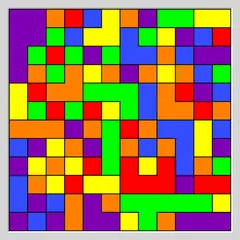
Same Game Blocks hands you a box full of colored squares and asks you to empty it. The catch is that you can only take away groups of two or more squares of the same color that touch along their edges. Every time a group goes, the squares above it fall down and any empty column closes up from the right.
Big groups are worth far more than small ones, so the real puzzle is deciding which colors to hold back for one large clear later.
Rules in brief
Clicking a square highlights every same-colored square linked to it. A line at the bottom tells you how many squares are in it and how many points removing them would earn. Click the same group again to clear it, or click a different one to change your choice.
Once a group vanishes, everything resting on it drops straight down. Should a whole column clear out, everything on its right slides over to fill the space. A lone square with no matching neighbor can never be removed by itself.
Scoring
Under the standard rule, a group of n squares scores (n - 2) squared. Pairs earn nothing, a group of five earns 9 and a group of ten earns 64. The numbers grow fast, which is why patience pays off.
The Custom menu offers a gentler (n - 1) squared rule where even pairs are worth a point. Custom also lets you set the grid size and number of colors. By default every board is built to have at least one full solution, but you can switch that off for wilder boards with bigger patches of color. Some of those cannot be fully cleared.
Board sizes
- You start on a 5x5 board with just three colors.
- Five presets in the Type menu run up to 20x15 with four colors.
- Custom lets you choose any size and color count.
Strategy notes
Pick one color to grow. Clear away the other colors around it so its scattered pieces fall together into a single big group, then remove it all at once.
Work from the bottom where you can. Clearing low groups shifts everything above them and often brings separated squares of the same color together.
Watch any color that is running low. A single square of it stranded away from its partners makes a full clear impossible. Since pairs score zero under the standard rule, use them to rearrange the board, not to earn points. Checking the score preview on a few groups before you commit is an easy way to find the best move.
Controls
| Action | Keyboard | Mouse | Touch |
|---|---|---|---|
| Select a group | Arrow keys to move the cursor, then Space or Enter | Left-click a square in the group | Tap a square in the group |
| Remove the selected group | Space or Enter again | Left-click the selected group again | Tap the selected group again |
| Cancel the selection | — | Right-click the selected group | Press and hold the selected group |
| Undo, redo, new board | U / R / N | Undo move, Redo move and New game buttons | Undo move, Redo move and New game buttons |
Same Game Blocks FAQ
Does Same Game Blocks work on a phone or Chromebook?
Yes. Tap a group to select it and tap again to remove it, or press and hold to cancel. On a Chromebook keyboard, the arrow keys move a cursor and Space or Enter selects and clears. U, R and N handle undo, redo and a new board.
Is there a timer?
No. You can take as long as you like over every move. There is no clock and no opponent, just you and the board, which makes it a relaxed puzzle you can pick up and put down.
What is the win condition?
Empty the box completely. When the last square is gone, the status bar shows COMPLETE along with your score. If you are left with only single squares that have no same-colored neighbor, no move is possible and the game ends with "Cannot move".
What if I make a bad move?
Undo it. Undo and redo have no limit, so you can rewind several moves and try a different order. A Restart button also takes you back to the very start of the same board.