Swap tiles to clear lines of matching colors, and keep scoring so the shrinking timer bar keeps refilling.
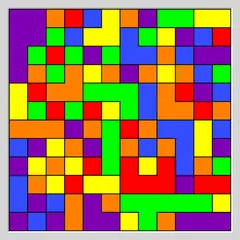
Color Tile Match is a timed swapping puzzle played on an 8x8 board packed with rounded tiles in six colors. You trade the places of two tiles that touch, and if that forms a straight line of three or more in one color, the line clears. Tiles above slide down into the gap and fresh ones drop in from the top.
The catch is the timer bar under the board. It drains constantly, and only scoring fills it back up, so you need to keep matching to stay in the round.
The goal
Score as many points as you can before time runs out. Every cleared line is worth its length squared. Three tiles give you 9 points, four give 16 and five give 25, so longer lines pay off far better than short ones.
About a third of each score is added back to the timer, though the bar can never go above its two-minute start. As your total grows, the bar also empties a little faster. The round ends when the timer hits zero or when no swap on the board can make a match. Your best result is kept for next time.
Boosters and helpers
Three boosters sit below the board and are earned through your score. A wild palette tile arrives every 250 points, a bomb every 500 and a brush every 1,000. A bar inside each button fills as you get closer to the next one.
- The palette drops in a tile that counts as any color.
- The bomb wipes out the selected tile and all the tiles around it.
- The brush clears tiles of one color, and the strip of color counts under the board tells you which color is most common.
To use one, pick a tile first and then press the booster button. The magnifier button shows a possible move, and the FAQ button opens the rules while pausing the clock.
Winning moves
Make your matches low on the board when you can. Clearing near the bottom shifts everything above it, and those falling tiles often line up into free chains that score without costing you a move.
Hunt for spots where one swap makes a line of four or five. The bigger payout buys more time as well as more points. Keep an eye on the number on the magnifier badge too. When it drops to one or two, the board is close to a dead end, and that is a good moment to spend a bomb or a wild tile.
Good to know
A swap that does not form a line simply slides back, with no penalty other than lost seconds. The text can be switched between English and Russian with the language button at the bottom.
Controls
| Action | Mouse | Touch |
|---|---|---|
| Swap two tiles | Click a tile, then click a neighbor, or drag a tile onto a neighbor | Tap a tile, then tap a neighbor, or slide a tile onto a neighbor |
| Highlight a possible move | Click the magnifier button | Tap the magnifier button |
| Use a booster on the selected tile | Select a tile, then click the brush, bomb or palette button | Select a tile, then tap the brush, bomb or palette button |
| Start a new game | Click the circular arrow button | Tap the circular arrow button |
| Read the rules (pauses the timer) | Click "FAQ" | Tap "FAQ" |
Color Tile Match FAQ
Is Color Tile Match good on a phone?
Yes. It was designed for phones first, and the tall layout fits a screen held upright. You can tap two tiles in turn or slide one tile onto its neighbor. On a computer or Chromebook, a mouse works the same way with clicks or drags.
Does the game remember my best score?
Yes. Your highest score is stored in your browser, so it is still waiting the next time you open the game on the same device. Clearing your browser data or switching to another computer means starting your record from scratch.
How long does a round last?
The timer bar starts at two minutes, but each scoring move pushes it back up, so a strong round can run much longer. It ends when the bar empties or when the board has no swap left that makes a match.
What if I cannot find a move?
Press the magnifier button to highlight one possible swap. Its badge also shows how many legal moves exist right now. If you wait about 15 seconds without moving, a hint shows up on its own.