Plan a robot's full route as a short program, then run it and hope every step lands where you counted.
Robot Coder is a coding puzzle that rewards planning. A robot waits on a grid next to colored items and targets of matching colors. You write every instruction it will follow before anything moves, and only then do you hit play. Once it starts moving, you cannot steer it or edit a single step, so one miscounted square can send it straight into a wall.
The game was built for the js13kGames 2018 contest, which means the whole thing is a very small download.
The goal
To clear a level, each item has to end up on the target that shares its color. Your robot can only hold a single item, though it is free to leave something on a blank square and fetch it again afterward.
You fail if the robot bumps into a wall, an item or a target, tries to pick up from an empty square, drops something in the wrong place, or finishes with targets still empty. A short message explains the problem, and the reset button returns everything to the start.
Writing a program
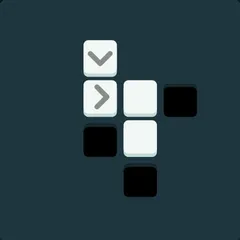
The code is written as a line of small icons:
- A green arrow advances one square.
- Curved arrows rotate the robot in place to the left or right.
- Blue up and down arrows pick up or set down an item.
- A loop repeats a section two to nine times.
The robot always acts on the square directly in front of it. It grabs what is there or drops what it holds onto that square. That means you need to face an item to collect it, not stand on top of it.
Loops are the key to short code. Four forward steps can shrink into one loop, and long repeating routes get much shorter. Loops count as characters too, so use them where they actually save space.
Earning stars
Every level has a target program length. Solving it earns a checkmark. Matching that length earns one star, and going shorter earns a second.
Start by finding a program that works at all. After that, come back to the level and cut it down. Look for repeated moves you can wrap in a loop.
Strategy notes
Count squares on the board before you type anything, and trace the full route in your head. Pay attention to turns, because two turns in the same direction leave the robot facing backward.
Setting an item aside on an empty square sometimes clears the way to somewhere you could not reach. The speed slider next to the play button helps when you are debugging, and the game highlights the symbol currently running so you can spot the exact step where things go wrong. Sound effects can be muted with a single button.
Controls
| Action | Keyboard | Mouse | Touch |
|---|---|---|---|
| Add a step forward | Underscore (_) | Click the forward arrow key | Tap the forward arrow key |
| Turn left or right | < or > | Click a turn key | Tap a turn key |
| Take or drop an item | Up arrow (take), Down arrow (drop) | Click the up or down arrow key | Tap the up or down arrow key |
| Add a repeat loop | Type a number from 2 to 9, then + or - to change it | Click the loop key, then plus or minus | Tap the loop key, then plus or minus |
| Move the cursor or delete | Left/Right arrows, Home, End, Backspace | Click the left, right or delete keys | Tap the left, right or delete keys |
| Run the robot | Enter | Click the play button | Tap the play button |
Robot Coder FAQ
Does Robot Coder work on a phone or Chromebook?
Yes. All commands appear as buttons on screen, which means a phone or tablet needs nothing but your finger. On a Chromebook you can click those keys or type commands on the keyboard, and Enter runs the robot. The board and keypad stack in one column, which suits a phone held upright.
Does it save my progress?
Yes. The shortest working program you find for each level is stored in your browser, along with the stars you earned. You can return later and keep working through the level list.
How many levels are there?
There are 24 in total. Three tutorials come first, followed by four themed groups that hold 21 more levels and open up as you solve puzzles. After five solved levels, a level editor unlocks so you can build your own maps up to 10 by 10.
What should I do when my robot keeps crashing?
Read the message that appears after a failed run, since it tells you what went wrong. Then slow the robot down with the speed slider and watch the highlighted symbol to see which step causes trouble. Press reset to put the board back.