Steer a drawing turtle with code blocks and recreate squares, stars and a moon using loops and angles.
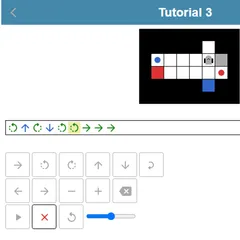
Block Code Turtle Art is a drawing game in which a pen follows your code. A little turtle, drawn as a circle with an arrow, waits on a black canvas. You stack blocks such as “move forward by 100” and “turn right by 90 degrees,” press Run Program, and the turtle traces white lines wherever it travels.
The more you play, the more you rely on loops. A few repeated blocks can produce a shape that would otherwise take dozens of single commands.
The goal
Each of the first nine levels shows a faint gray picture and a short task, for example drawing a square. Your program wins when its lines match that outline. Level ten has no target at all. It opens up extra categories, including logic, math, lists, variables and functions, so you can design any pattern you like.
How the levels grow
You begin with a square, then a pentagon. Stars come next, made from just a handful of blocks. Later tasks ask for four stars placed at the corners of a square, yellow stars joined by white lines, a full moon built from 360 lines, and finally a crescent.
Pen blocks join the toolbox along the way. You can change the line color and width, and you can lift the pen so the turtle moves without leaving a mark.
Strategy notes
- Turning 360 degrees in total points the turtle back the way it started.
- A five-point star needs 144-degree turns, which makes the lines cross over each other.
- Lift the pen before moving to a new spot, then lower it to draw again.
- Put one loop inside another. The inner loop draws a star, and the outer one repeats that star and moves to the next corner.
Fixing a drawing that goes wrong
When a picture comes out crooked, press Reset and slow the drawing down by moving the slider to the turtle end. At a slow speed you can watch every line form and spot exactly which block sends the turtle off course. Often the culprit is a single angle or distance, or blocks stacked in the wrong order. Fix that one thing, run the program again, and compare with the outline. Once it works, slide back toward the rabbit icon to see the drawing appear almost instantly.
Controls
| Action | Mouse | Touch |
|---|---|---|
| Open a block category | Click Turtle, Loops or another category name | Tap the category name |
| Build the program | Drag blocks into the workspace and snap them together | Drag blocks with your finger |
| Change a distance, angle or color | Click the value on a block and pick a new one | Tap the value and pick a new one |
| Run or clear the drawing | Click Run Program, then Reset | Tap Run Program, then Reset |
| Change drawing speed | Drag the slider between the turtle and rabbit icons | Slide the speed control |
Block Code Turtle Art FAQ
Can I play Block Code Turtle Art on a phone or Chromebook?
A Chromebook works well, since you only drag blocks and click values. Touch screens can drag blocks too, but the canvas and workspace sit side by side, so a tablet turned sideways is much more comfortable than a small phone.
Do I need math to draw the shapes?
A little geometry helps. For any shape with equal sides, divide 360 by the number of sides to get the turn angle. A square turns 90 degrees four times, and a pentagon turns 72 degrees five times.
How do I know if my drawing is correct?
Each target level shows a faint gray outline. After your program finishes, the game compares your white lines against it. If they line up, you get a congratulations message and the JavaScript your blocks created.
Does it remember the levels I finished?
Yes. Finished levels are saved in your browser, so you can come back on the same device and continue where you stopped. You can also revisit an earlier drawing at any time and try a shorter program for it.