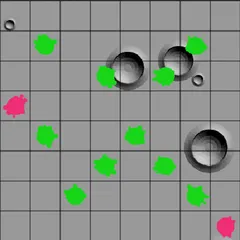
Fire beams into a sealed grid and use where they exit to deduce the spots of the hidden balls.
Black Box Lasers is a deduction puzzle. A handful of balls hide somewhere inside a dark square grid, and you never get to look inside. What you can do is shoot a laser in from any square on the border and see where, or whether, it comes back out. Every result is a clue, and your task is to mark the exact location of each ball.
The default box is eight by eight with five balls. The real challenge is not just finding them but doing it with as few beams as possible.
Rules in brief
A beam moves in a straight line until a ball changes its path. If a ball is directly in front of it, the beam is swallowed, and the game marks that shot with an H. If a ball sits one square ahead and off to one side, the beam turns a right angle away from it. A beam can turn several times before it escapes.
When a beam returns through the very square it entered, or gets turned away right at the edge, you see an R. When it exits at a different square, both the entry and the exit get the same number so you can match them up.
Reading the clues
An H tells you a ball lies somewhere along that beam’s route, though the route may have bent first. An R has more than one possible cause, so think about each before you commit. A shot that comes straight out the opposite side usually means that lane is empty, yet two turns can cancel each other out. Back it up with another beam.
A good opening is a shot through the middle rows and columns, which often reveals quickly whether balls cluster near the center.
Tools that help
Right-click a square, or press Space with the keyboard, to lock it as empty. Locking an edge square locks its whole row or column. That way a stray click cannot drop a ball where you already know there is none. Press U to undo, R to redo, and N for a fresh box. Undo has no limit.
Who it suits
This one is for players who enjoy slow, careful logic more than reflexes. There is no timer, and a single puzzle can take a few minutes or much longer depending on the size you pick. Larger boxes with more balls can produce layouts that look different but behave the same, which is why the checker judges beams rather than exact positions.
Controls
| Action | Keyboard | Mouse | Touch |
|---|---|---|---|
| Fire a laser | Arrow keys to an edge square, then Enter | Left-click a square on the edge | Tap a square on the edge |
| Place or remove a guessed ball | Arrow keys inside the box, then Enter | Left-click inside the box | Tap inside the box |
| Lock a square, row or column | Space | Right-click a square, or an edge square for its whole row or column | Press and hold |
| Check your guesses | Move to the button in the top left corner, then Enter | Click the button that appears in the top left corner | Tap the button that appears in the top left corner |
| Undo, redo, new box | U / R / N | Undo move, Redo move and New game buttons | Undo move, Redo move and New game buttons |
Black Box Lasers FAQ
Does Black Box Lasers work on a phone or Chromebook?
Yes. On a touch screen you tap edge squares to fire and tap inside the grid to mark balls, and a long press locks a square. On a Chromebook you can click, right-click, or use the arrow keys with Enter and Space.
How do I know if I solved it?
Once you have marked as many balls as are hidden, a button shows up in the top left corner. Press it and the game checks your layout. Any arrangement that would give the same result for every possible beam is accepted.
What should I do if I am stuck?
Fire another beam through the area you are least sure about. A wrong guess also helps, since the game then circles one shot that disproves it or reveals one extra beam in red. Solve shows the full answer if you want to give up.
Can I change the size of the box?
Yes. There are five presets, from a small 5x5 box with three balls up to 10x10 boxes with as many as ten. You can also set a custom width, height and ball count.