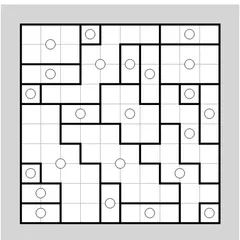
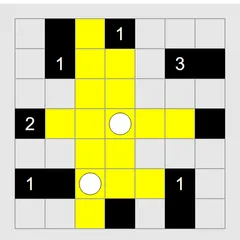
Trace a single ring through the grid, bending at every black pearl and running straight across every white one.
Pearl Loop Puzzle asks you to trace one closed ring across a grid, guided by pearls placed in some of the squares. A black pearl tells the path to turn. A white pearl tells it to go straight. Those two rules sound plain, yet a few pearls can be enough to decide the shape of the entire loop.
Your path links the centers of neighboring squares. It must form one ring, so no crossing and no branching are allowed.
What each pearl demands
On a black pearl, the path has to make a right-angle turn. After that turn, it must keep going straight for at least one more square in both directions. That means neither neighboring square along the path can be a corner.
On a white pearl, the path goes straight through, either side to side or top to bottom. But it cannot be part of an endless straight run. The path has to bend in one or both of the squares directly before and after it.
Squares with no pearl are optional. Use them or skip them as the route requires.
Drawing and marking
Click an edge between two squares to add or remove a segment, or drag through several squares to sketch a long stretch at once. Dragging back over a section erases it. Right-click an edge, or hold Shift and press an arrow key, to mark it with a cross. Crosses remind you which edges you have ruled out.
If you would rather see the path drawn on the grid lines themselves instead of from center to center, change the display style under Preferences.
Strategy notes
- A black pearl touching the border, or sitting one square in from it, has no room to point an arm at that edge. Its arm on that side must extend two squares inward.
- When three white pearls line up in a row, the path crosses each of them at a right angle to that row.
- Two black pearls side by side always point their arms away from each other.
- Hold off on closing the ring. A small loop that closes early is wrong unless it already includes every pearl.
Sizes and options
Eight presets live in the Type menu. They cover four sizes, 6x6, 8x8, 10x10 and 12x8, and each comes in an Easy and a Tricky version. The game starts on 8x8 Tricky. Custom lets you set your own size, and it can also permit puzzles that may have more than one answer. That option makes very large boards quick to generate.
Controls
| Action | Keyboard | Mouse | Touch |
|---|---|---|---|
| Draw or erase loop segments | Enter to start and end a keyboard drag, arrows to move | Left-click an edge, or left-drag through squares | Tap an edge, or drag through squares |
| Mark an edge with a cross | Shift + arrow | Right-click the edge | Press and hold the edge |
| Toggle the edge next to the cursor | Ctrl + Shift + arrow | — | — |
| Cancel a keyboard drag | Space, Escape or Backspace | — | — |
| New game, undo, redo | N, U, R | Menu buttons above the grid | Menu buttons above the grid |
Pearl Loop Puzzle FAQ
Does Pearl Loop Puzzle work on a phone or Chromebook?
Yes. Drag your finger through squares to draw, and drag back over a section to erase it. A long press on an edge crosses it out. On a Chromebook, left-click or drag to draw and right-click to cross out, or use the arrow keys with Enter to draw from the keyboard.
How do I know I've won?
The board flashes once your path is one closed ring that never crosses or branches, and every pearl on the grid sits on it with its rule satisfied. Empty squares can be used or left out, so the path does not need to cover the whole board.
Is it a single-player puzzle?
Yes. It is a solo logic game with no timer. You can start a new board with N, and undo or redo with U and R, so you are free to test ideas and step back when they do not work.
Which board should I start with?
Try a 6x6 grid at Easy from the Type menu. The game opens on 8x8 Tricky by default, which is a step up. Once Easy boards feel comfortable, move on to Tricky or the larger 10x10 and 12x8 sizes.