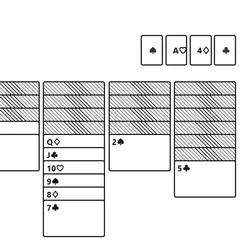
A solitaire where you can see every card. Plan with four spare cells and eight columns until all four suits are built.
FreeCell Solitaire is a one-player card game where nothing is hidden. Every card in the deck lands face up across eight columns, so you can study the whole layout before you touch anything. Your job is to move all 52 cards onto four foundation piles, one per suit, building from Ace to King.
Since you can see everything, success comes down to planning rather than luck. Four spare slots, called free cells, give you room to shuffle cards around while you work.
The layout
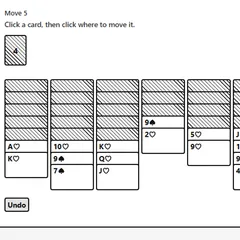
The deal puts seven cards in each of the first four columns and six in each of the other four. A counter keeps track of how many moves you’ve made.
How moves work
Inside the columns, a card may sit on another card one step above it in rank, as long as the colors differ. A black 6 can go on a red 7, for example. Any single card is allowed to fill a vacant column.
A free cell has room for only one card. Park a card there to uncover something useful, then later move it back to a column or up to its foundation. To play a card home, select it and then pick the foundation of its suit.
You can also move a whole run at once. How long that run can be depends on your open space. More empty cells and empty columns let you carry bigger stacks.
Strategy notes
- Find the low cards early. Spot where the Aces and 2s are buried and figure out the shortest path to free them.
- Treat free cells as precious. Each one you fill shrinks the size of run you can move, so only use them with a clear goal.
- Value empty columns highly. An open column is worth more than a spare cell, because it doubles your moving power.
- Build tidy runs. Long stacks that alternate red and black are easy to shift as one unit later.
Good to know
When the board starts to open up, press “Collect to foundations.” It sends each card that is allowed on a foundation, and keeps going while new ones become playable. One press of Undo reverses the whole batch if you want it back.
Your deal and move count are stored in your browser, so a reload brings you back to the same spot. The undo history resets after a reload, though, so finish any tricky backtracking first. Each new game is a random shuffle, which means a solution is likely but not promised.
Controls
| Action | Keyboard | Mouse | Touch |
|---|---|---|---|
| Select a card, run or free-cell card | Tab to the card, then Enter or Space | Click the card | Tap the card |
| Move the selection | Tab to the target, then Enter | Click a column, an empty free cell or the matching foundation | Tap a column, an empty free cell or the matching foundation |
| Send every playable card home | — | Click "Collect to foundations" | Tap "Collect to foundations" |
| Undo | — | Click "Undo" | Tap "Undo" |
| Start a new deal | — | Click "New game" (under "Menu" if hidden) | Tap "New game" (under "Menu" if hidden) |
FreeCell Solitaire FAQ
Will FreeCell Solitaire work on my phone or Chromebook?
Yes. You can tap cards on a phone or tablet, and the layout works in either orientation. On a Chromebook or other computer, click with the mouse, or press Tab to move between cards and Enter or Space to select.
How do I know when I have won?
You win once all four Kings sit on top of their foundation piles, meaning every card has been sorted by suit from Ace up. The game then shows a "Cleared" message along with your move count.
What should I do if I get stuck?
Use Undo and step back to an earlier point where you still had open cells or an empty column. Most deals can be won, so a dead end usually means an earlier choice used up your free space too soon.