Roll the die and race all four of your tokens home before your rivals do, against the computer or friends on one screen.
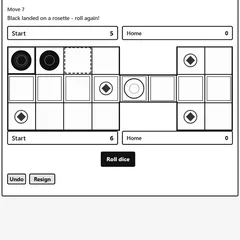
Ludo is a classic race for two to four players on a cross-shaped board. Each side has four tokens parked in a corner base, and the first player to march all of them into the center wins. You can take on computer opponents or pass one phone around the room.
This version was designed with plain black-and-white screens in mind. Instead of relying on color, the sides are marked with shapes: solid circles, rings, squares and triangles.
Rules in brief
On your turn, roll the die and move one token forward by the number shown. You need a 6 to bring a token out of the base, and that same number earns an extra throw. Roll a 6 three times in a row, though, and you lose the rest of your turn.
Every token loops clockwise around the outer track before turning into its own lane that leads to the center. You need the exact number to finish. Land on a lone enemy token anywhere but a safe square and you send it back to its base.
Safe squares are each side’s starting square and the diamond eight steps past it. Tokens on these spots can share space and cannot be captured. Two of your own tokens on the same square make a block, and rivals can’t land on it or jump over it.
Setting up a match
Choose vs Computer or Local hotseat, then pick how many players are in, which token shape is yours, and the computer’s level. Press New game to begin. A status line reports every roll and move, while a tracker at the top keeps score of finished tokens for every player.
Undo takes back your last move if you tap the wrong token. Resign ends the game when you want a fresh start.
Winning moves
- Get two or three tokens onto the track early. More tokens in play means more choices with each roll and more chances to capture.
- Count the squares behind you. An enemy within six spaces can hit your token next turn, so stepping out of range often beats racing ahead.
- When a rival is lurking close behind, hop onto a diamond or any start square.
- Build a block in front of a player who is nearly home. It can stall them for several turns.
- Keep a spare token in play near the end. When a roll is too big for your lead token, you still have a useful move.
Who it suits
Ludo works well as a family game or a quick match between friends at the same desk. Solo players can tune the challenge with the three computer levels.
Controls
| Action | Keyboard | Mouse | Touch |
|---|---|---|---|
| Roll the die | — | Click "Roll" | Tap "Roll" |
| Move a token | Tab to the token's square (arrow keys move across the board), then Enter | Click the token you want to move | Tap the token you want to move |
| Take back your last move | — | Click "Undo" | Tap "Undo" |
| Set up a game | — | Pick vs Computer or Local hotseat, players, your token and level, then click "New game" | Pick vs Computer or Local hotseat, players, your token and level, then tap "New game" |
| Give up the current game | — | Click "Resign" | Tap "Resign" |
Ludo FAQ
Is Ludo a one-player or multiplayer game here?
Both. In vs Computer mode you take on between one and three bots at Easy, Medium or Hard. In Local hotseat, two to four people share the same device and take turns with their own pieces. No account is needed for either mode.
Does the game save if I close the tab?
Yes. The current game is stored in your browser, so it picks up where you left off after a reload. Clearing your browser data or opening it on another device will start you fresh.
Can I play on a phone or Chromebook?
Yes. Tap Roll and then tap the token you want to move. The board is laid out for a phone held upright. On a Chromebook you can click with the touchpad, or Tab to a square, move with the arrow keys and press Enter.
How long does a game take?
It depends on the number of players and the rolls. A game ends when one side brings its whole set of four tokens home, and since the last steps need an exact roll, the finish can take a few extra turns. Resign ends a game early.