Slide full lines of a jumbled pipe grid back into order so every tile joins one network with no loops.
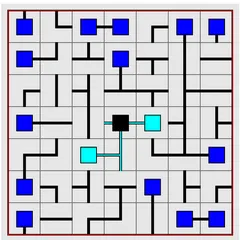
Netslide Pipe Puzzle takes a pipe network and turns it into a sliding puzzle. Every piece is already facing the correct direction. The problem is that the pieces are in the wrong squares, and the only way to move them is to shift a whole row or column by one step.
When a line slides, the tile that drops off one end pops back in at the other. One move changes several tiles at once, which is what makes the puzzle tricky.
Rules in brief
Arrows sit around the edge of the grid, at both ends of each row and column. Clicking one pushes that line a single square in the arrow’s direction. Right-click, or hold your finger on an arrow, to push the line the opposite way.
The network starts from a black source tile. Tiles connected to it change color to cyan or teal, so you can see how much of the network is already working. You need to rebuild the network so every tile is part of it and no pipes form a closed loop.
Board types
The Type menu lists nine boards: 3x3, 4x4 and 5x5, with easy, medium and hard versions of each.
- Easy boards draw red barrier lines. Pipes can never connect across a barrier, so each one is a clue about where tiles belong.
- Medium boards remove the barriers completely.
- Hard boards add wrapping, so pipes can run off one edge and come back on the opposite side.
Custom lets you set the size, the barrier amount and whether the grid wraps.
Strategy notes
Start with a 3x3 easy board. The barriers give away a lot, so you can work out the layout in your head before you make a single slide.
Then build the solution one line at a time. Finish the top row first and work your way down, which keeps completed rows from getting knocked out of place. When you need to move a single tile, you can shift its column, slide the row into place, and then return the column to where it was.
Dead ends are useful clues. Each one has to plug into a pipe that eventually leads back to the source, which narrows down where it can sit.
Who it suits
This puzzle is a good next step if you already enjoy pipe or sliding puzzles and want both at once. The small boards are short and friendly, while wrapping hard boards will keep a patient player busy. You can play with a mouse, the keyboard or touch.
Controls
| Action | Keyboard | Mouse | Touch |
|---|---|---|---|
| Slide a row or column in the arrow's direction | Arrow keys to move the marker around the edge, then Enter | Left-click an arrow | Tap an arrow |
| Slide a row or column the opposite way | — | Right-click an arrow | Press and hold an arrow |
| New game, undo, redo | N, U, R | Menu buttons above the grid | Menu buttons above the grid |
Netslide Pipe Puzzle FAQ
Does Netslide Pipe Puzzle work on a phone or Chromebook?
Yes. Tap an arrow to push its row or column in the direction it points, and press and hold an arrow to push the other way. On a Chromebook, use left and right clicks, or move a marker around the edge with the arrow keys and press Enter.
How do I win?
Every tile has to join a single network linked to the black source tile, with no closed loops. Look for a count in the status bar such as 'Active: 4/16'. Once both numbers match, the grid flashes and COMPLETED shows up with your move count.
Is it a one-player game?
Yes. It is a solo puzzle with no timer, though the status bar does count your moves. That gives you something to improve on if you replay a board size and want a tidier solve.
What should I do when the board gets scrambled?
Undo is unlimited, letting you step back through as many slides as you need. If you want to see the answer, Solve finishes the board, and the move counter then tracks moves made after the auto-solve.