Rotate scrambled pipe tiles until the whole grid forms one connected network without any loops.
Net Pipe Puzzle starts with a board of pipe tiles, all jumbled by spinning every tile at random. You put it right by turning the tiles back. When you are done, all the pipes should join into a single network that reaches every square, with no pipe going around in a circle.
The tiles never move, they only rotate. Each board has one solution, and you can reach it with pure logic.
Rules in brief
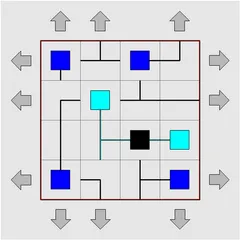
Every tile holds one shape: an end piece, a straight piece, a bend or a T-junction. A black square near the center is the source. Any tile that connects back to it lights up, and end pieces change from blue boxes to cyan as soon as they connect.
To finish, every tile has to join the same network. No pipe may aim at the outer border, and the network cannot loop back on itself. If you create a loop by accident, it shows up in red.
Where to start
The border is your best friend. A piece on the edge cannot face outward, so it often has only one or two possible positions. Corners are even stronger on a normal board. A bend in a corner square fits only one way, while a T-junction is never allowed in a corner.
Two dead ends should never face each other, since that would make a tiny closed pair with no link to anything else. A T-junction resting on a wall has to keep its flat side against that wall. Once you are certain about a tile, lock it with S, a middle-click or Shift and click, so a stray click cannot turn it later.
Wrapping boards
The Type menu offers five sizes, from 5x5 up to 13x11, and each one also comes in a wrapping version. On those, a pipe leaving the right edge comes back in on the left, and the top and bottom connect the same way. With no outer wall, the easy edge clues disappear, so save these for when the normal boards feel easy. To look across the seam, hold Shift and press an arrow to scroll the grid, and Ctrl plus an arrow key moves the source.
Custom settings
The Custom option lets you choose any board size and add barriers. Barriers are fixed walls between squares, and they work as extra clues because no pipe can pass through them. It is a good way to make a large board a little more forgiving.
Controls
| Action | Keyboard | Mouse | Touch |
|---|---|---|---|
| Rotate a tile anticlockwise | Arrow keys to select, then A | Left-click | Tap |
| Rotate a tile clockwise | D | Right-click | Press and hold |
| Rotate a tile by 180 degrees | F | — | — |
| Lock or unlock a tile | S | Middle-click or Shift + click | — |
| Shift a wrapping grid / move the light source | Shift + arrows / Ctrl + arrows | — | — |
| New game, undo, redo | N, U, R | Menu buttons above the grid | Menu buttons above the grid |
Net Pipe Puzzle FAQ
Can I play Net Pipe Puzzle on a phone or Chromebook?
Yes. On a touchscreen, tapping spins a tile anticlockwise, while holding your finger on it spins it clockwise. A Chromebook works with left and right clicks, or with the keyboard, where the arrows move a cursor and A, D and F rotate. Locking tiles needs a mouse or keyboard, but you don't need it to win.
How do I know I've solved it?
A status bar below the board keeps a count of tiles linked to the source. When every tile is linked, it changes to COMPLETED and the grid flashes. The network must not contain a closed loop, and no pipe may point into the outer wall.
Is it a single-player puzzle?
Yes. It is a quiet solo logic puzzle with no timer. Each board has exactly one correct arrangement, so you never need to guess, and you can start a new board with N whenever you like.
What if I'm completely stuck?
Undo and redo have no limit, so you can back out of a wrong path step by step. If you want to see the answer, Solve fills in the whole network for you. There is no hint button.