Hole out in the fewest strokes on nine handmade mini golf greens with bumpers, bends and a moving gate.
Mini Putt Park is a nine-hole mini golf course viewed from straight above. Every hole was designed around its own idea. One is crowded with round stone bumpers, one curls around a wall bent into an L, and on the final hole a gate moves up and down across your path.
On each green the aim is simple: get the ball into the cup with the fewest strokes you can manage. The rolling and bouncing come from a real physics engine, so angles and power behave the way you would expect.
Getting started
You begin on a course map with a small live preview of every hole. Pick any one to play it, or press a number from 1 to 9. A strip at the top shows which hole you are on, your strokes so far on it, and your total.
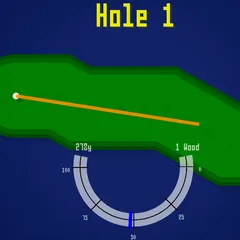
To hit, press on the ball and pull toward the spot you want it to go. The ball travels the same way you drag, not backward like a slingshot. A longer pull means more power, and a readout at the bottom shows the strength of the shot. Release to putt. When the ball is resting, a faint guide line points toward the cup.
Reading the course
Planks, stones and the outer walls all send the ball bouncing off at an angle. The edges of each course are springy, which opens up bank shots around obstacles that block the straight path.
The cup is picky about speed. A slow ball drops in, but a fast one can hop right across it. When the ball falls, SUNK flashes on the screen and the next hole loads.
Strategy notes
- On long holes, play to stop near the cup instead of trying to hole it in one hard hit.
- On the bumper field, a medium-strength putt through a gap stays under control better than a fast shot that pinballs between stones.
- The U-shaped hole has angled boards along its right side. Use them to redirect the ball around the long wall and back toward the cup.
- Hole 9 has a red striped gate. Let it cycle once or twice, then putt so the ball arrives at the middle as the gap opens.
Good to know
R returns the ball to its starting spot and resets the strokes for that hole, though strokes you already took stay in your total. Choosing a hole from the map starts a new total. N skips ahead, and Esc or the menu icon in the top right returns you to the course map.
Controls
| Action | Keyboard | Mouse | Touch |
|---|---|---|---|
| Pick a hole on the course map | Number keys 1 to 9 | Click a hole preview | Tap a hole preview |
| Aim and set power | — | Press on the ball and drag toward where it should go; drag farther for more power | Touch the ball and drag toward your target |
| Putt | — | Release the button | Lift your finger |
| Replay the current hole | R | — | — |
| Skip to the next hole | N | — | — |
| Back to the course map | Esc | Click the menu icon (top right) | Tap the menu icon (top right) |
Mini Putt Park FAQ
Does Mini Putt Park work on a phone or Chromebook?
Yes. On a phone, turn it sideways, because holding it upright brings up a prompt to rotate. Put a finger on the ball, slide it the way you want to hit, and lift off to take the shot. On a Chromebook, use the touchpad or a mouse, and number keys 1 to 9 jump straight to a hole.
How long does a full round take?
The course has nine holes, and most players can move through it at their own pace since there is no timer. After the ninth hole the game loops back to the first, so you can keep playing or stop whenever you like.
Is it one player?
Yes. It is a solo game where you try to finish every hole, and the full course, with the lowest stroke count possible. The top of the screen tracks this hole and your overall total.
How do I cancel a bad aim?
Shorten your drag until the power reading drops under 5 percent, then let go. A tiny drag like that does not count as a putt, so you can line up again without adding a stroke.